Nervecentre V8.1 Help for Users
Finding your patient list
You can find a list of your patients. On a mobile, you receive tasks and alerts for patients on your patient list.
Finding your patient list on a mobile
 Finding your patient list
On iOS
-
Select Patients.
-
At the top of the screen, select .
-
Select a patient list.
To search for a patient list, select .
-
Select an option.
-
To view a patient list, select View only.
-
To view a patient list and set the patient as your personal list, select Set as My Patients.
You receive tasks and alerts for patients on your personal list.
-
On Android
-
From , select Patients.
-
At the top of the screen, select .
-
Select a patient list.
To search for a patient list, select .
-
Select an option.
-
To view a patient list, select VIEW ONLY.
-
To view a patient list and set the patient as your personal list, select SET MY LIST.
You receive tasks and alerts for patients on your personal list.
-
Finding your patient list on a desktop
Finding your patient list
A patient list dashboard is the combination of a patient list and clinical note profile.
-
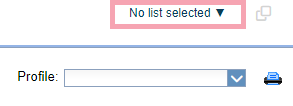
From Inpatients > Patient List, select .
-
Select a patient list.
To search for a list, from Filter / Search, enter the name of a patient list.
-
From Profile, select a clinical note profile.
Read more about viewing a clinical note profile
The clinical note profiles you see depend on your permissions.
-
Depending on your organisation, you can filter your patient list dashboard.
Did you find this article helpful? Yes No
Sorry about that. Our help is a work in progress and we welcome any feedback.
Why wasn't this helpful? Please select one reason:
Thanks for your feedback.
Great!
Thanks for taking the time to give us some feedback.